Architecture, IAM(Identity and Access Management), and Visibility — “What Are We Actually Protecting?”
In Lesson 1, we covered the why behind cybersecurity: governance, policy, risk, and vulnerability response. Now we’re moving into the what and how:
What systems exist in a modern environment, how they’re structured, and how defenders maintain visibility.
If you’re studying Security+, this lesson gives you the core language you’ll see on exams. If you’re aiming for CySA+, this lesson matters because it shows up in real analyst work every day: hardening systems, understanding cloud designs, validating identity controls, and interpreting logs.
This post is based on CompTIA CySA+ (CS0-003) Lesson 3.
The “Big Idea” of Lesson 3 (Exam + Real Life)
If Lesson 1 is the rulebook (policy + risk), Lesson 3 is the map of the city.
Operating Systems = where attackers live once they get in
Virtualization/Cloud = where your systems actually run now
Zero Trust = why “inside vs outside” doesn’t work anymore
IAM = who is allowed to do what
DLP/PKI/Logging = how you prevent loss, prove trust, and see what happened
CompTIA even frames it this way through the objectives: system/architecture, OS concepts, cloud models, IAM, and data protection/visibility.
1) Operating System Concepts (Where Security Gets Real)
System Hardening
Textbook definition: System hardening is the process of securely configuring an OS, application, device, or service by reducing its attack surface—disabling unnecessary features, restricting access, applying secure baselines, and enforcing least privilege.
Simple definition: Hardening = turn off what you don’t need and lock down what you do.
Remember for tests (and life):
Hardening is about reducing attack surface
Use secure baselines like CIS Benchmarks and DoD STIGs
Defaults are usually built for convenience, not security
Memory hook:
“If you’re not using it, disable it.”
Windows Registry (and why defenders care)
Textbook definition: The Windows Registry is a hierarchical database that stores OS, device, and application configuration settings.
Simple definition: The registry is Windows’ settings brain.
Root keys (high exam value)
CompTIA lists five root keys (know these names):
HKCR – HKEY_CLASSES_ROOT - what program opens what file.
HKCU – HKEY_CURRENT_USER
HKLM – HKEY_LOCAL_MACHINE
HKU – HKEY_USERS - settings for every user on the computer.
HKCC – HKEY_CURRENT_CONFIG - the hardware setup Windows is using right now.
Quick “what matters most”
HKLM = system-wide settings (big for persistence and malware changes)
HKCU = settings for the currently logged-in user (user-level changes)
Windows Registry Files (more exam terms)
CompTIA calls out these registry hive files:
SAM
SECURITY
SOFTWARE
SYSTEM
DEFAULT
Memory hook:
“Windows keeps secrets in the registry—attackers love it, defenders audit it.”
Linux Configuration Files (no registry here)
Textbook definition: Linux typically stores configuration as text-based config files rather than a centralized registry database.
Simple definition: Linux settings live in files, not a database.
Memory Hook:
Linux config files are commonly in /etc
Configuration File Formats (know these)
CompTIA highlights common config standards:
INI – key=value
XML – tag-based
YAML – indentation + “:”
JSON – structured data (brackets/braces)
Simple definition: These are ways apps store settings—and misconfigurations often become vulnerabilities.
2) Virtualization, Containers, and Emulation (Modern Infrastructure)
Virtualization & Hypervisors
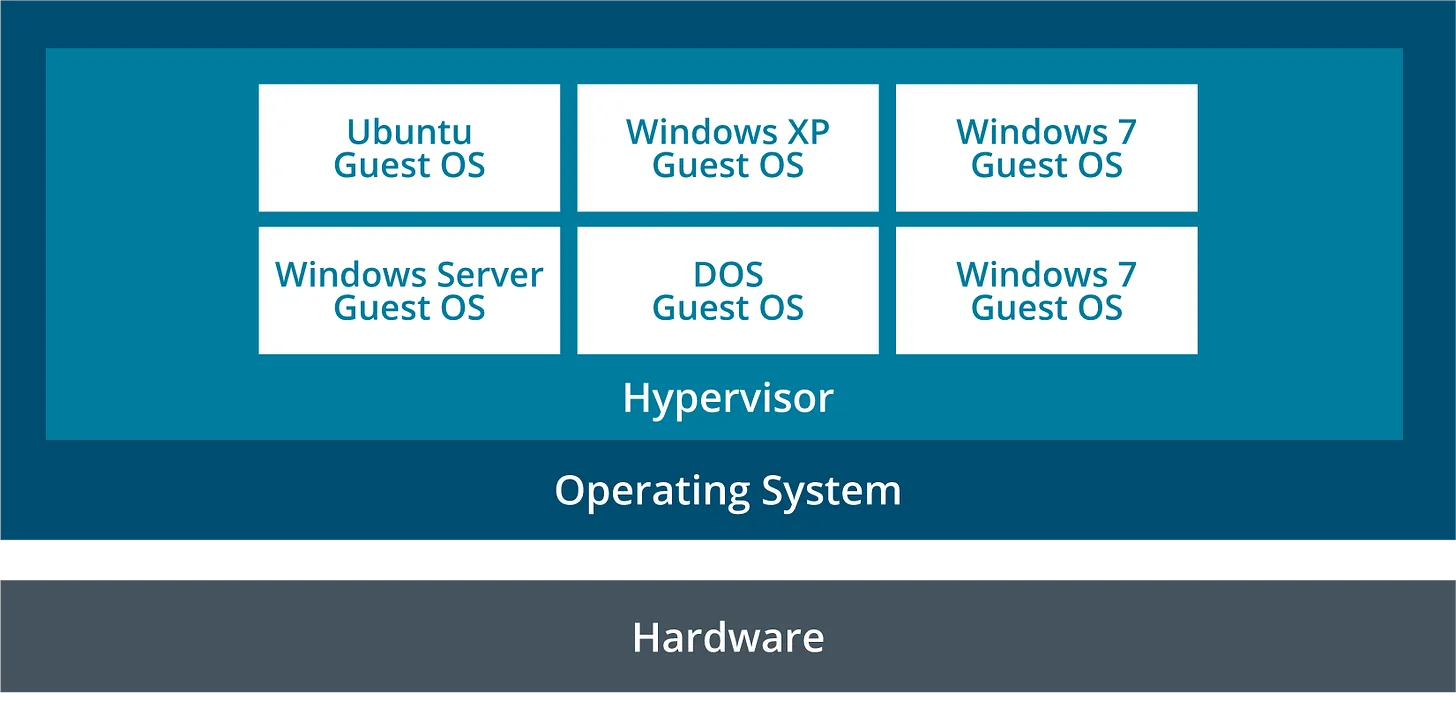
Textbook definition: Virtualization uses a hypervisor to abstract physical hardware so multiple virtual machines (VMs) can run on one host.
Simple definition: Virtualization = one big computer pretending to be many computers.
Type I vs Type II Hypervisor (high exam value)
CompTIA breaks it down like this:
Type I (bare metal): enterprise-grade, purpose-built
Type II (hosted): runs on top of a normal OS (great for labs)
Memory hook:
Type I = “I run the show.” Type II = “I run inside the show.”
Containers vs Virtual Machines
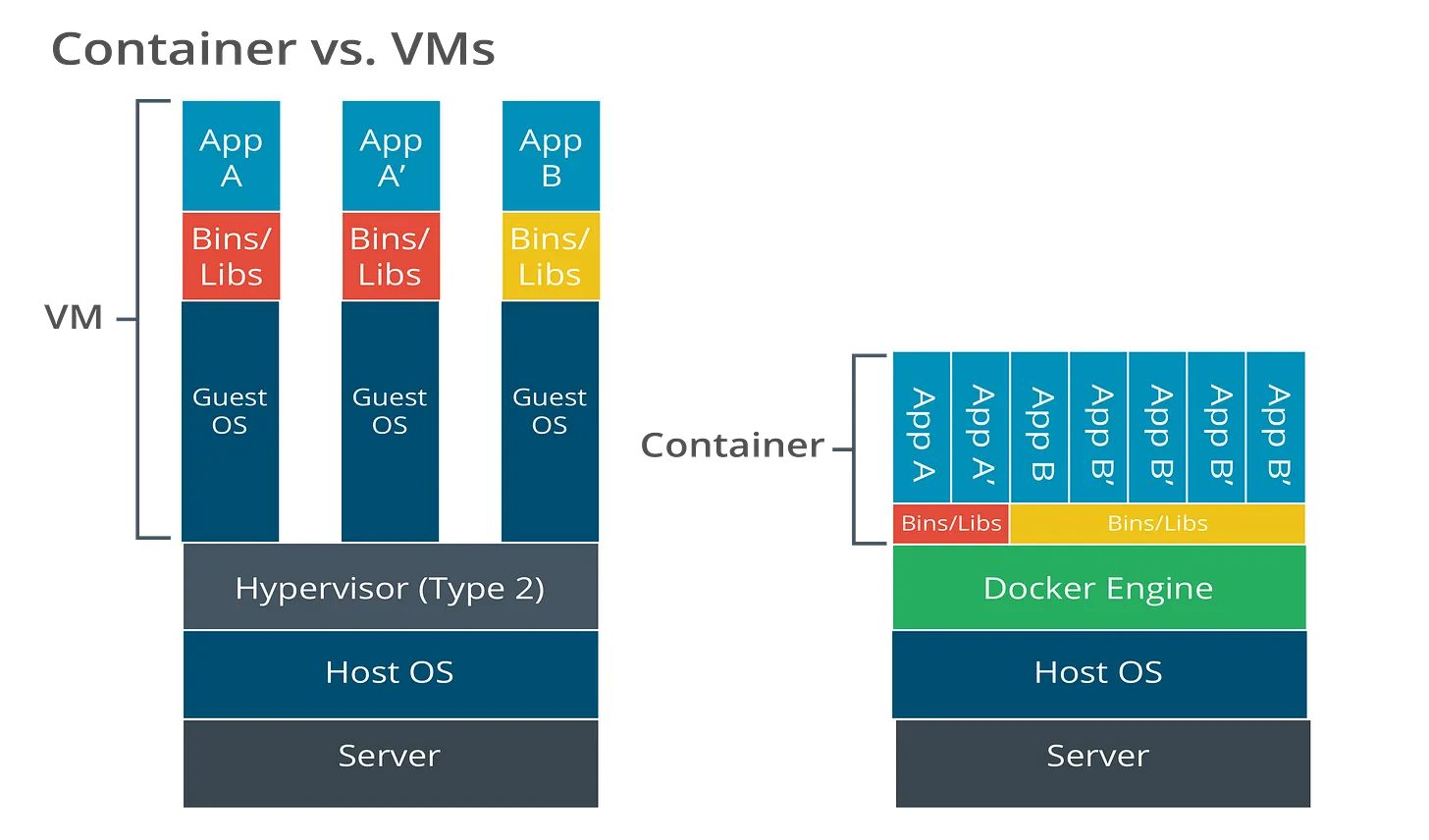
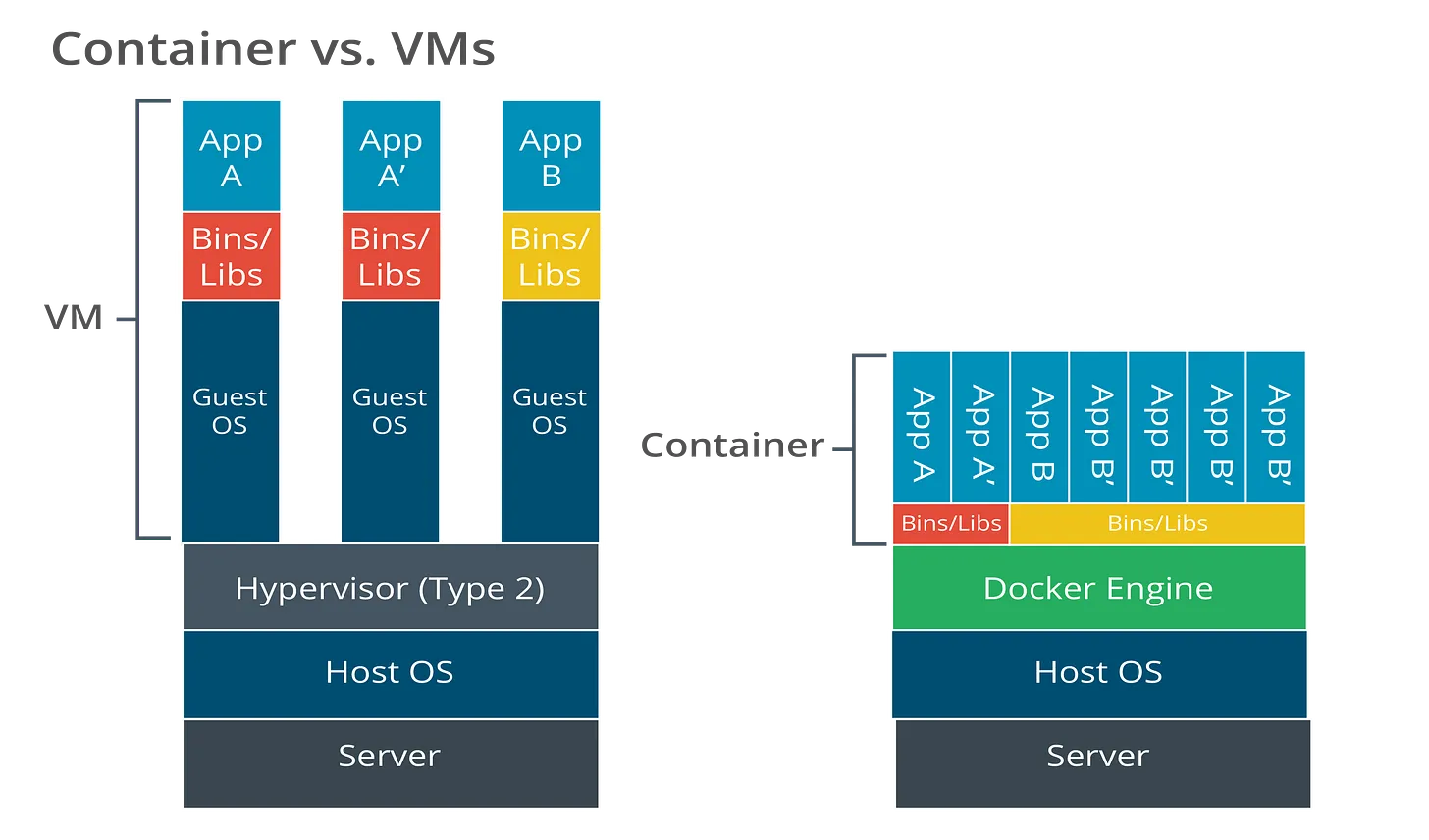
Textbook definition: Containerization packages applications and dependencies while sharing the host OS kernel, making it lighter than full VMs.
Simple definition: VMs are houses. Containers are apartments.
CompTIA includes a visual showing VMs each have a Guest OS, while containers share the host OS through a container engine (like Docker). (See the “Containers vs. Virtual Machines” graphic on page 12.)
Textbook definition: A cloud deployment model defines where cloud resources run and who controls them.
Simple definition: Cloud models explain where your stuff lives and who manages it.
CompTIA’s three models:
Public cloud
Technical definition: A public cloud is a cloud deployment model where computing resources (servers, storage, databases, networking, apps) are owned and operated by a third-party provider and delivered over the internet to multiple customers (multi-tenant).
Simple definition: Public cloud = renting IT from a provider online.
Microsoft Azure: Virtual Machines, Blob Storage, Azure SQL, Azure Functions
Google Cloud: Compute Engine, Cloud Storage, Cloud SQL, Cloud Functions
When organizations choose it:
fast deployment, easy scaling, lower upfront cost
good for web apps, dev/test, burst workloads, startups
Private cloud
Technical definition: A private cloud is a cloud deployment model where cloud infrastructure is dedicated to a single organization, providing greater control over security, compliance, and configuration. It can be hosted on-premises or hosted by a provider but remains single-tenant.
Simple definition: Private cloud = your own cloud—only your organization uses it.
Examples (what it looks like in real life):
An enterprise data center running VMware vSphere/NSX as an internal cloud
OpenStack used to deliver self-service VMs/storage internally
Government/DoD environment where systems run in a dedicated cloud environment for compliance
predictable workloads + strong internal IT capability
Hybrid cloud
Technical definition: A hybrid cloud combines private cloud (or on-prem/on-premises infrastructure) with public cloud services, allowing data and workloads to move between them as needed.
Simple definition: Hybrid cloud = some systems stay “in-house,” some run in the public cloud—connected together.
Examples (common patterns):
Sensitive data (PII/PHI) stays on a private cloud, while the public website runs on AWS/Azure
On-prem Active Directory + cloud apps in Microsoft 365/Azure, using federation/SSO
Disaster recovery: on-prem primary systems + backups/replicas in the public cloud
“Cloud burst”: normal traffic handled on-prem, spikes handled in public cloud
When organizations choose it:
want cloud scalability but must keep certain data/systems private
gradual cloud migration (most common real-world approach)
Quick memory trick for the exam
Public = shared provider infrastructure
Private = dedicated to one org
Hybrid = mix of private + public working together
Exam tip: If asked “which is most common?”—CompTIA frequently pushes public cloud adoption as the norm. (Also appears in their review questions.)
Serverless Computing (why it’s a big deal)
Textbook definition: Serverless is a cloud model where the provider manages the infrastructure and applications run as functions—removing the need to manage server operating systems.
Simple definition: Serverless = you deploy code, not servers.
Security reality check (what students forget):
Less patching of servers by you…
But identity, permissions, and code security become even more critical.
4) SDN, Deperimeterization, and Zero Trust (Why “Inside/Outside” Is Dead)
Software-Defined Networking (SDN)
Textbook definition: SDN abstracts physical network devices and uses a centralized control plane to manage traffic policies dynamically.
Simple definition: SDN = software controls the network instead of manually configuring every box.
Exam memory hook:
SDN is automation for networking.
Deperimeterization
Textbook definition: Deperimeterization describes the shift away from a clearly defined internal (“trusted”) network perimeter.
Simple definition: The perimeter is gone because work happens everywhere.
Textbook definition: Zero Trust is an architecture that assumes no implicit trust and requires continuous verification of users, devices, and access requests.
Simple definition: Zero Trust = trust nothing, verify everything.
CompTIA highlights key components like IAM, policy enforcement, segmentation, visibility, data protection, and threat detection.
Exam tip: If asked what Zero Trust focuses on, CompTIA points to users/assets/resources—not static perimeters.
5) IAM (Identity & Access Management)
IAM is where “security policy” turns into “who can do what.”
Authentication Factors (high exam value)
Textbook definition: Authentication factors are categories of evidence used to verify identity.
PIFI — Personally Identifiable Financial Information
CHD — Cardholder Data
IP — Intellectual Property
Simple memory hook:
PII = “who you are” PHI = “your health” PIFI = “your money identity” CHD = “your card details” IP = “your ideas and inventions”
PKI and SSL Inspection
Textbook definition: PKI is a framework for managing public/private keys and digital certificates to support encryption, authentication, integrity, and non-repudiation.
Simple definition: PKI = the trust system behind HTTPS.
SSL Inspection (super testable concept)
CompTIA explains the problem: encrypted traffic can hide threats, so organizations may use SSL inspection to decrypt, inspect, and re-encrypt traffic for security enforcement.
Simple definition: SSL inspection = opening the sealed envelope to scan it, then resealing it.
7)Logging: Your Security “Time Machine”
Log Ingestion
Textbook definition: Log ingestion is collecting logs from multiple sources and centralizing them for analysis.
Simple definition: Log ingestion = pulling all evidence into one place.
CompTIA examples: auth servers, app servers, web servers, databases.
Time Synchronization (don’t skip this)
Textbook definition: Time synchronization ensures systems share accurate time so analysts can establish correct event order.
Simple definition: Time sync = making sure everyone agrees what time it is.
Exam/real-world point: If clocks are off, your timeline is wrong—and investigations fall apart.
Logging Levels (know these for tests)
CompTIA lists common levels: DEBUG, INFO, WARNING, ERROR, CRITICAL.
Simple definition: Logging levels = how serious the message is.
Logging Levels (Complete List for Tests)
Common Application Logging Levels
These are the standard levels you’ll see in applications, APIs, and security tools:
DEBUG – Detailed diagnostic information (used for troubleshooting)
INFO – Normal operations and routine events
WARNING (WARN) – Something unexpected, but not yet an error
ERROR – An operation failed; system still running
CRITICAL – Severe failure; system may be unusable
Syslog Severity Levels (0–7)
Syslog uses numeric severity levels, where 0 is the most severe and 7 is the least:
LevelNameMeaning
0-Emergency (emerg)System is unusable
1-Alert (alert)Immediate action required
2-Critical (crit)Critical conditions
3-Error (error)Error conditions
4-Warning (warn)Warning conditions
5-Notice (notice)Normal but significant
6-Informational (info)Informational messages
7-Debug (debug)Debug-level messages
Simple Definition (One Line)
Logging levels = how serious the message is.
Memory Hooks (High-Value for Exams)
0 = “Everything is on fire 🔥”
1–2 = “Fix this NOW”
3–4 = “Something is wrong”
5–6 = “FYI”
7 = “Developer chatter”
What You Really Need to Remember for Exams
If you’re cramming, prioritize these:
Must-memorize list
CIS Benchmarks vs DoD STIGs (hardening baselines)
Linux configs live in /etc
Type I vs Type II hypervisors
VMs vs Containers (guest OS vs shared kernel)
Public/Private/Hybrid cloud models
Deperimeterization + Zero Trust = trust nothing, verify everything
Auth factors (know/have/are), MFA, SSO, PAM
SAML/OpenID/Federation, Transitive trust
CASB vs DLP (cloud access control vs data movement control)
PII/PHI/PIFI/CHD/IP
Log ingestion, time sync, logging levels
Closing: Why This Lesson Matters in the Series
Lesson 1 taught you how organizations decide what “secure” means through governance, policy, and risk. Lesson 3 shows you the environment those decisions apply to—operating systems, cloud infrastructure, identity, data protection, and logging.
This foundation is essential because everything later in the series—threat hunting, SIEM analysis, incident response, and vulnerability management—depends on understanding how systems are built and how defenders maintain visibility.
In the next post, we will build on this architecture foundation and start connecting it directly to how attackers operate and how defenders detect them in practice.